What Is a Digital Operations Workspace? A Practical Guide
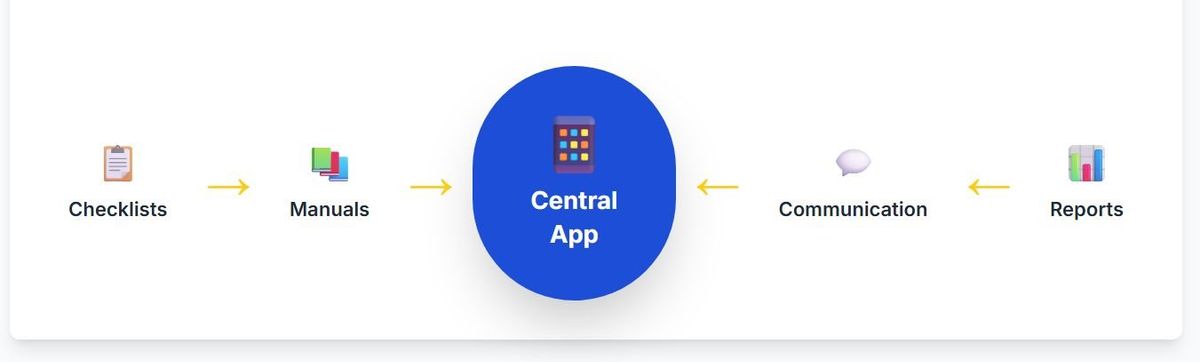
A digital operations workspace is one mobile-first place where frontline teams find their standards, receive targeted updates, complete routines and training, and report deviations, while head office and area managers see execution across all locations. It replaces a patchwork of intranet, LMS, checklist app, chat groups and email with one connected flow from knowing to doing.
A simple definition
A digital operations workspace is the place where frontline work and the information behind it come together. On their phone, a store manager or shift worker finds the current procedure, sees the updates meant for their role, completes today's routines and reports anything that is not OK. Head office and area managers see the same reality from above: what has been read, what has been done and where help is needed.
The word that matters is connected. Most chains already have manuals, a way to send news, some checklists and some training. The problem is that they live in different places, and nothing links the standard to the moment it should be applied. An operations workspace closes that gap.
Why the category exists
Frontline teams make up most of the workforce in restaurants, retail, fitness and service businesses, yet most workplace software was built for people at desks. Intranets assume a laptop and an email address. Learning platforms assume time set aside for courses. Project tools assume office work.
The result in many chains is a patchwork: a PDF manual, a WhatsApp group per location, an email newsletter from HQ, a separate checklist app and an LMS that only HQ logs into. Each tool solves one problem and adds another place to look. Store managers become the human integration layer between them.

Intranet vs LMS vs checklist app vs operations workspace
| Intranet | LMS | Checklist app | Operations workspace | |
|---|---|---|---|---|
| Main job | Publish news and documents | Deliver courses and track certificates | Record that tasks were done | Connect standards, communication, training, routines and follow-up |
| Typical user | Office staff | HR and trainees | Shift staff | Everyone from HQ to the shift team |
| Device | Desktop first | Desktop or mobile | Mobile | Mobile first, desktop for admins |
| Link from standard to task | No | No | Rarely | Yes |
| Shows whether information became action | No | Course completion only | Task completion | Read confirmation, verified routines, deviations |
| Network view for managers | Page views | Training records | Per-site lists | Execution and deviations across locations |
The point is not that the other tools are bad. It is that none of them alone covers the path from knowing to doing.
What a workspace typically includes
- Digital manuals and handbooks. Searchable, versioned procedures with photos and video, filtered by role.
- Targeted communication. News and updates to specific roles, locations, regions or brands, with read confirmation for what matters.
- Checklists and tasks. Scheduled routines with OK / Not OK answers, values and photos, and one-off tasks with owners and deadlines.
- Onboarding and training. Role-based learning paths with quizzes and manager sign-off.
- Forms. Incident reports, store visits, maintenance requests and surveys.
- Messaging. Direct and group communication without private phone numbers.
- Reporting. Completion, deviations and read status across locations.
- Roles and permissions. Who sees and edits what, by role and location.
Curious how many tools one workspace could replace for you? Book a short intro and we will map your current tools against one connected flow.
The flow from knowing to doing
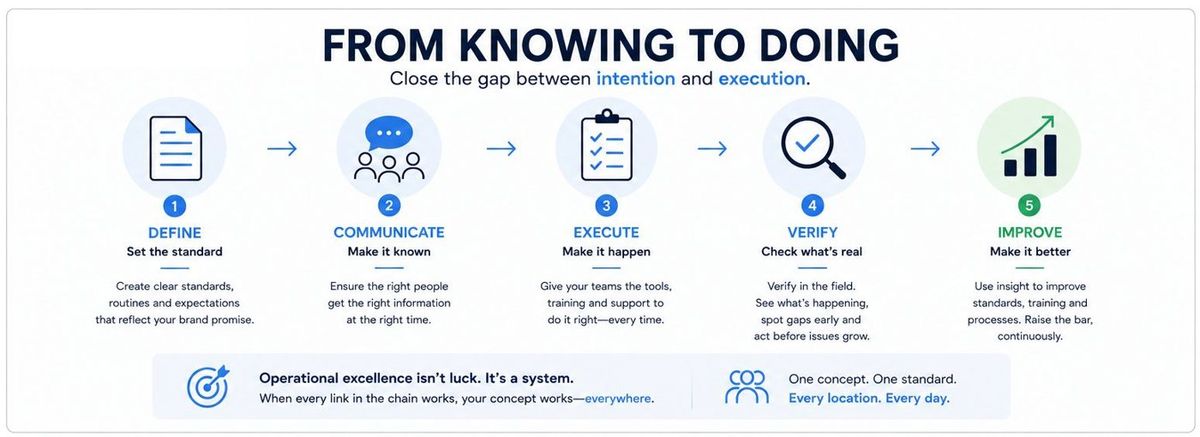
A useful way to think about a workspace is as a loop: define the standard, communicate it, put it into a routine, verify it, and improve. When a procedure changes, the update goes to the affected roles with a read confirmation, the related checklist point is updated and linked to the new procedure, and managers can see which locations have applied it. When a location reports Not OK, the deviation reaches the right person and becomes a task, and if many locations report the same problem, HQ improves the standard.
Examples by industry
What the workspace carries differs by business, but the pattern is the same:
- Restaurant chains. Opening, pre-peak and closing routines with temperature values and photos, recipes and allergen information in the manual, campaign set-up checklists and onboarding for each station. See restaurants.
- Retail chains. Store opening and closing, visual merchandising standards verified with photos, campaign rollouts with deadlines, and price or planogram changes with read confirmation. See retail.
- Fitness clubs. Equipment and cleaning rounds, member-area checks, incident forms and instructor onboarding across clubs. See gyms and fitness.
- Service businesses. Field or salon routines, safety checks, customer-facing standards and quick onboarding of new staff. See salons and service.
- Franchise networks. All of the above, plus access for independent franchisees, local content within brand rules and a network view for the franchisor. See franchising.
Who needs a digital operations workspace
You are likely to benefit if several of these are true:
- You have many locations or mobile teams that must deliver the same standard.
- Most of your staff work on the floor, not at a desk.
- Staff turnover means you onboard new people all the time.
- Updates from HQ get lost in email or chat groups.
- You cannot easily see which locations follow routines and which do not.
- Area managers spend much of their time chasing status instead of coaching.
- You run franchisees or partners who need access without being on your corporate IT.
If you run one location with a small, stable team, a lighter tool is probably enough.
What changes for the store manager
The biggest difference is felt by the store manager. Instead of checking email, two chat groups, a shared folder and a paper log, they open one app in the morning: today's routines and who is doing them, new updates for their role, open deviations to close and the onboarding status of new staff. Less time is spent forwarding and chasing, more on the floor with the team.
How to evaluate one
- Start with the frontline: test the mobile app with a real shift worker.
- Check connection: can a checklist point link to a procedure, and can an update trigger a routine?
- Look at targeting and permissions for your structure: roles, locations, regions, brands and franchisees.
- Ask to see a network view with realistic data and ask what action each number leads to.
- Check how much your own operations team can set up and change without the vendor.
- Pilot with a few locations and measure adoption and verified routines, not logins.
Our franchise operations software buyer's guide has a full criteria table and demo questions.
Common mistakes
- Moving the mess into a new app. Clean up and shorten the most important procedures before go-live.
- Launching everything at once. Start with communication and two or three critical routines, then add onboarding and forms.
- Keeping old channels open. If updates still go out by email and chat, people will keep looking there. Agree on one place.
- Forgetting ownership. Someone in operations must own content and routines after launch.
How Chainformation fits
Chainformation is a digital operations workspace built for chains and franchise networks. Manuals, targeted news, checklists, onboarding, forms, messaging and reporting share the same users, roles and locations, on mobile and desktop. Learn more on how it works, the features overview and the franchise intranet page, or read what a franchise intranet is.
See a connected workspace with your own content. Book a 15-minute intro. Bring one procedure, one update and one checklist, and we will show how they connect.
FAQ
What is a digital operations workspace?
It is a single digital place, used mainly on phones and tablets, where frontline teams access standards, updates, routines and training, and where managers follow up on execution across locations. The key idea is connection: information, tasks and results live in the same system.
How is an operations workspace different from an intranet?
An intranet publishes information. An operations workspace also carries the work that follows from it: checklists, tasks, onboarding, read confirmations and deviation handling, with results visible to managers.
Is a connected worker platform the same as an LMS?
No. An LMS manages courses, certificates and training records. A connected worker platform or operations workspace supports the daily work itself, with instructions at the point of work, routines and follow-up. Training can be part of it, but it is not the main purpose.
Who needs a digital operations workspace?
Organisations with many locations or mobile teams that must deliver the same standard everywhere, such as restaurant chains, retail chains, franchise networks, fitness clubs and service businesses. It matters most when frontline staff do not sit at desks.
Do we have to replace all our existing tools?
No. Payroll, POS, ERP and HR systems stay. What a workspace replaces is the patchwork used to inform and steer frontline execution: scattered documents, email updates, separate checklist apps and chat groups.
Canonical: /resources/guides/what-is-a-digital-operations-workspace